Toolbox Settings
You can find this command in the Settings panel, when working in a Drawing Environment. The Toolbox Settings allow various adjustments for the following functions: Title Block, Border Frame Swap, Scale, Inspection Table, Tolerance Table, Dimensions Table.

Toolbox Settings
When accessing the command, a dialog box with different settings is displayed.
Options Tab

Toolbox Settings - Options Tab
In the Options Tab you can find:
- Scale
Enter here the desired property name. - Templates Title block
Reference here a drawing template with the desired Title block. - Templates Border frame
Reference here a drawing template with the desired Border frame.

Please make sure that the margins and title block are placed in one sheet in the drawing template, otherwise it will not be recognized.
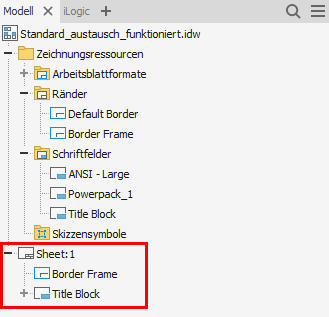
Margins and title block in drawing template
Inspection Table Tab

Inspection Table Tab
Inspection Table Tab contains:
- Title
Define the title of the table in the drawing browser. - Heading Column 1
Define here the name of the column for the Designation. - Heading Column 2
Define here the name of the column for the Dimension. - Heading Column 3
Define here the name of the column for the Inspection Rate.
Tolerance Table Tab

Tolerance Table tab
You can edit the following options in the Tolerance Table Tab:
- Title
Specify the naming of the table in the drawing browser. - Heading Column 1
Define here the name of the column for the Standard dimension. - Heading Column 2
Define here the name of the column for the Shaft/Hole. - Heading Column 3
Define here the name of the column for the upper and lower values of the Tolerance. - Heading Column 4
Define the name of the column for the maximum and minimum Dimensions.
Dimensions Table Tab

Dimensions Table tab
Dimensions Table Tab consists of:
- Label
Define here the name of the column for the Designation. - Size
Define here the name of the column for the Standard dimension. - Shaft/Hole
Define here the name of the column for the Shaft/Hole. - Tolerance Range
Define here the name of the column for the upper and lower values of the Tolerance. - Dimension Range
Define the name of the column for the maximum and minimum Dimensions. - Inspection Rate
Define here the name of the column for the Inspection rate.
Related Topics
- Title Block Swap
- Border Frame Swap
- Scale
- Inspection Dimensions
- Tolerance Table
- Dimensions Table
- File Properties