Stiffeners
Stiffeners are made from plates that are attached to member webs or flanges to stiffen them against local deformations and to increase locally the resistance. Stiffeners are also used to provide additional support to members at connection locations.
Example 1: For a Gusset connection, stiffeners are used to prevent buckling of the gusset plate or to increase the column/beam resistance.
Example 2: For a Moment End Plate connection, they are added when the resistance of the column is exceeded but a full bending resistance of the beam is required.
The most usual stiffener section is the flat stiffener. It can be one side (other side) or both sides.

Types of stiffeners
For each joint type, the Stiffeners command opens a dialog with options for configuring the available types of stiffeners.
Note:
-
In Stiffeners dialog, the navigation through each type of stiffener is done using the tree-view control. In order to enable a certain stiffener type, check the corresponding item from the tree. See also FAQ How to navigate through the Tree-View control in Advance Designer – Steel Connection .
-
Details regarding the stiffeners calculation can be found on Stiffeners verification chapter inside the Report or in Stiffeners chapter from Theoretical background.
-
The user can set chamfers for any of the available stiffeners. If there are no stiffeners enabled, the content of the Chamfers dialog is grayed-out.
Next, for each joint, will be presented the options for configuring the available stiffeners.
General Tab
-
Web stiffeners – represent the stiffeners placed perpendicular to the column flange.

Base plate model with web stiffeners
-
Flange stiffeners – represent the stiffeners placed at the ends of the column flange, perpendicular to the web of the column.

Base plate model with flange stiffeners
-
Middle stiffeners – represent the stiffeners placed perpendicular to the web of the column.

Base plate model with middle stiffeners
The following parameters are available for Web stiffeners, Flange stiffeners, and Middle stiffeners:
- Thickness: enter the thickness of the stiffeners.
- Number: enter the number of stiffeners.
- Width: enter the width value of the stiffeners.
- Height: enter the height value of the stiffeners.
- Interm. dist.: option becomes available when the Number of stiffeners is greater than 1. Select from the drop-down how to define the distance between stiffeners:
Absolute value - enter the intermediate distance between two consecutive stiffeners.
Stretch to column side – the stiffeners are distributed until the column edges and the distance between stiffeners is calculated automatically.
- Shortening: option becomes available only when Interm. dist. parameter is set as Stretch to column side. Enter a value to change (shorten or extend) the distance on which stiffeners are defined. This will change the edge position for the first and the last stiffener from the group and the intermediate distance between stiffeners will be recalculated.
- Offset: select from the combo-box the reference from where the stiffeners group should be moved and then enter the value to shift the stiffeners group.
-
Outer stiffeners

Base plate model with outer stiffeners
- Thickness: enter the thickness of the stiffeners.
- Width: select from the drop-down how to define the width of stiffeners:
Absolute value - enter the width value of the stiffeners.
Stretch to column side – the stiffeners will be defined until the column flanges and the width of the stiffeners will be calculated automatically.
Plate overhang – the stiffeners will be defined until the plate edges and the width of the stiffeners will be calculated automatically.
- Shortening: option becomes available only when Width parameter is set as Stretch to column side or Plate overhang. Enter the shortening value to decrease or increase the width of the stiffeners.
- Height: enter the height value of the stiffeners.
- Offset: enter the value to offset the group of stiffeners.
The following type of stiffeners will be available and editable only for reduced base plate configuration (length of the base plate is shorter than the height of the column section):
-
Sloped / Vertical stiffeners

Base plate model with sloped stiffeners
- Thickness: enter the thickness of the stiffeners.
- Layout: available only for Sloped type – use the drop-down to define the slope of the stiffeners. Two options are available:
By height – define the slope by entering the Height value of the stiffeners and the Length parameter will be calculated automatically.
By angle – define the slope by entering the Angle between the horizontal plane and the stiffener direction, as it is shown in the picture from the dialog. The Length parameter will be calculated automatically.
- Length: refers to the real length of the stiffeners. The text box is always grayed-out and the value is calculated automatically.
- Height: enter the height of the stiffeners. For Sloped type, the option becomes editable only when the layout parameter is set as by Height, otherwise, it is calculated automatically.
- Angle: enter the angle between the horizontal plane and the stiffener direction, as it is shown in the picture from the dialog. The option is relevant only for sloped stiffener and becomes editable only when the layout parameter is set as by Height, otherwise, it is calculated automatically.
- Offset: enter a value between the stiffeners and the base plate edges.
-
Horizontal stiffeners

Base plate model with horizontal stiffeners
- Thickness: enter the thickness of the stiffeners.
- Length: refers to the length of the stiffeners which are always created between the column flanges. The text box is always grayed-out and the length is calculated automatically.
Chamfers Tab
In this dialog, you can configure chamfers for the enabled stiffeners with the following parameters:
- Type: select the cut type between: Straight, Concave or Convex.
- Radiu: enter the radius of the cut, available only for Concave and Convex chamfer types.
If Straight chamfer type is selected, the following will become editable:
- Height: enter the height of the cut.
- Width: enter the width of the cut.

Base plate model with chamfers enabled for flange stiffeners
There are two frames displayed in the Chamfers dialog: Inner corner cut refers to the chamfer applied to the inner sides of the stiffener and Outer corner cut refers to the chamfers done on the outer sides of the stiffener.
Note:
- The Inner corner cut chamfer can be enabled by checking the corresponding box from Inner corner cut title.
- Outer corner cut will be automatically enabled when Inner corner cut is created for Web stiffeners, Flange stiffeners, and Middle stiffeners.
- For Outer corner cut, only Straight chamfer type can be defined.
- For Horizontal stiffeners only Inner corner cut is available.
-
Column stiffeners category has two items to be configured: the Upper stiffener and the Lower stiffener.

Moment end plate model with column stiffeners
General Tab:
- Side: select an option from the associated drop-down: One side, Other side, Both sides to define on which side the stiffener will be created.
- Length: select an option from the associated drop-down to define the length of the stiffeners:
Absolute value – enter the length of the stiffeners.
Relative to half the side – the stiffener is defined as half of the distance between beam flanges and the length of the stiffener is calculated automatically.
Relative to 3/4 of the side - the stiffener is defined as 3/4 of the distance between beam flanges and the length of the stiffener is calculated automatically.
Relative to the full side - the stiffener is defined between beam flanges and the length of the stiffener is calculated automatically.
Relative to the full side + offset - the stiffener is defined between beam flanges with the possibility to shorten this distance, by entering a value for Shortened parameter. In this case, the length of the stiffener is calculated automatically.
- Shortened: enter the shortening value for the Length of the stiffeners. Available only when the reference Relative to the full side + offset is selected for Length.
- Width: select an option from the associated drop-down to define the width of the stiffeners Absolute value – enter the width of the stiffeners.
Relative to column – the stiffener is defined from the web of the beam to the end of the beam flange and the width of the stiffener is calculated automatically.
Relative to column + offset – the stiffener is defined from the web of the beam to the end of the beam flange with the possibility to shorten this distance, by entering a value for Shortened parameter. In this case, the width of the stiffener is calculated automatically.
- Shortened: enter the shortening value for the Width of the stiffeners. Available only when the reference Relative to column + offset is selected for Width.
Chamfers Tab:
There is one frame displayed in the Chamfers dialog: Inner chamfers refers to the chamfer applied to the inner sides of the stiffener and contains the following parameters:
- Type: select the cut type: Straight, Concave or Convex.
- Radius: enter the radius of the cut, available only for Concave and Convex chamfer types.
If Straight chamfer type is selected, the following will become editable:
- Height: enter the height of the cut.
- Width: enter the width of the cut.

Moment end plate model with concave chamfers enabled for column stiffeners
-
Beam stiffeners category has two items to be configured: the Upper stiffener and the Lower stiffener.
Two types of beam stiffeners are available: Haunch and Plates.
If Haunch is selected for stiffeners type, three tabs will be available: Haunch, Stiffeners, and Chamfers.
- Haunch tab. It contains the following parameters:
- In the field Length, enter the length of the haunch
- In the field Height, enter the height of the haunch.
- Select the Type from the drop-down: Plates (haunch made from welded plates) or Profile (haunch made from profile). If Profile is selected, you can choose a profile using the drop-downs. Check the Same as beam box to use the same profile as for the beam.

Moment end plate model with lower haunch defined from profile
If Plates is selected, enter the web thickness, flange thickness, and flange width values.

Moment end plate model with lower haunch defined from plates
- Stiffeners tab:

Moment end plate model with haunch stiffeners enabled
This tab will be used to configure the stiffeners located on the beam, next to the end of the haunch, as shown in the picture from the dialog and contains the following parameters:
- Check Enable stiffeners box to activate the stiffeners
- The rest of the parameters: Thickness, Length, Shortened, Width, Shortened are similar to the one presented at Column stiffeners.
- Chamfers tab:

Moment end plate model with chamfers enabled for haunch and its stiffener
The dialog is split into two frames:
- Haunch stiffeners: refers to the chamfer applied to the inner sides of the stiffener and contains the same parameters as Chamfer tab from Column stiffeners.
- Haunch chamfers: refers to the chamfers that can be applied on haunch and you can input the following parameters: Inner width, Beam width, End plate width which are displayed in the dialog picture.
If Plate is selected for stiffener type, two tabs will be available: General and Chamfers.
General tab:

Moment end plate model with plate stiffener enabled
It contains the following parameters:
- In the field Length, enter the length value.
- In the field Width, select from the drop-down:
Absolute value - enter the width value of the stiffeners.
Plate overhang – the stiffeners will be defined until the end plate edge and the width of the stiffeners will be calculated automatically.
- Check outside vertical box to define vertically the exterior edge of the plate.
Chamfers tab:
Inner chamfer refers to the chamfer applied to the inner sides of the stiffener and contains the following parameters:
- Inner type: select the cut type: Straight, Concave or Convex.
- Inner radius: enter the radius of the cut, available only for Concave and Convex chamfer types.
If Straight chamfer type is selected, the following will become editable:
- Inner height - enter the height of the cut.
- Inner width - enter the width of the cut.
Outer chamfer refers to the chamfers done on the outer sides of the stiffener and contains the following parameters:
- Outer height - enter the height of the cut.
- Outer width - enter the width of the cut.

Moment end plate model with chamfers enabled for plate stiffener
- Middle column stiffeners
Four types of middle column stiffeners can be selected from the drop-down.
- Normal stiffeners
Each normal stiffeners type: Upper middle or Lower middle can be enabled when the corresponding haunch is enabled (ex: Upper haunch is enabled, therefore Upper middle stiffeners can be enabled).
Note: Normal stiffeners are always placed on the column web at the level of the beam flanges.

Moment end plate model with normal stiffeners enabled
General tab:
- Check the box: Upper middle or Lower middle to activate the stiffeners.
- The rest of the parameters: Side, Thickness, Length, Shortened, Width, Shortened are the same as the one presented at Column stiffeners.
-
Morris stiffeners

Moment end plate model with Morris stiffeners enabled
General tab:
- Width - select an option from the associated drop-down, same as the one from Column stiffeners: Absolute value, Relative to column, Relative to column + Offset.
- Shortened -enter the shortening value for Width.
- Horiz. Length - enter the length for the horizontal part of the stiffener.
- Orientation – select the orientation for the sloped part of the stiffener: Down or Up.
-
Web doubler

Moment end plate model with Web doubler enabled
General tab:
- Side: select an option from the associated drop-down: One side, Other side and Both sides to define on which side the stiffener will be created.
- Thickness: enter the thickness of the stiffener.
- Width: select an option from the associated drop-down, same as the one from Column stiffeners: Absolute value, Relative to column or Relative to column + offset.
- Shortened: enter the shortening value for Width.
- Length: select an option from the associated drop-down to define the length of the stiffeners:
Absolute value – enter the length of the stiffeners.
Relative to stiffeners – the stiffener is defined between the column stiffeners and the length of the stiffener is calculated automatically.
Relative to stiffeners + offset - the stiffener is defined between the column stiffeners with the possibility to shorten this distance, by entering a value for Shortened parameter. In this case, the length of the stiffener is calculated automatically.
- Shortened: enter the shortening value for Length.
-
Sloped stiffener

Moment end plate model with Sloped stiffener enabled
General tab:
- Side: select an option from the associated drop-down: One side, Other side and Both sides to define on which side the stiffener will be created.
- Orientation: select the orientation of the stiffener:
Inner-lower/outer-upper: the stiffener is defined from the left - lower corner to the right - upper corner.
Inner-upper/outer-lower: the stiffener is defined from the right - lower corner to the left - upper corner.
- Thickness: enter the thickness of the stiffener
- Length: select an option from the associated drop-down to define the length of the stiffeners:
Absolute value – enter the length of the stiffeners.
Relative to stiffeners – the stiffener is defined between the column stiffeners and the length of the stiffener is calculated automatically.
Relative to stiffeners + offset - the stiffener is defined between the column stiffeners with the possibility to shorten this distance, by entering a value for Shortened parameter. In this case, the length of the stiffener is calculated automatically Shortened: enter the shortening value for Length.
- Width: select an option from the associated drop-down, same as the one from Column stiffeners: Absolute value, Relative to column or Relative to column + offset.
- Shortened: enter the desired shortening value for Width.
Chamfers tab for Middle stiffeners: contains the same parameters detailed on Column stiffeners - Chamfers tab.
Note: Web doubler stiffener type has no chamfer to be configured, therefore only General tab is available for this type.
-
Web stiffeners

Moment end plate model with web stiffeners enabled
General tab:
- Member side: select an option from the associated drop-down: One side, Other side and Both sides to define on which side the stiffener will be created.
- Thickness: enter the thickness of the stiffener.
- Width: enter the width of the stiffener.
- Length on column: enter the length of the stiffener placed on column side.
- Length on beam: enter the length of the stiffener placed on beam side.
- Chamfers tab: contains the same parameters detailed on Beam stiffeners Plate type - Chamfers tab.
-
BEAM STIFFENERS Left beam / Right beam
Beam stiffeners category has two main parents to be configured: the Left beam side and the Right beam side. For each side, two items can be enabled: Upper stiffener and Lower stiffener.
The parameters to configure the Beam stiffeners for Apex Haunch joint are the same as the ones detailed at Beam stiffeners dialog from Moment End Plate joint.

Apex haunch model with haunches defined from profiles

Apex haunch model with haunches defined from plates
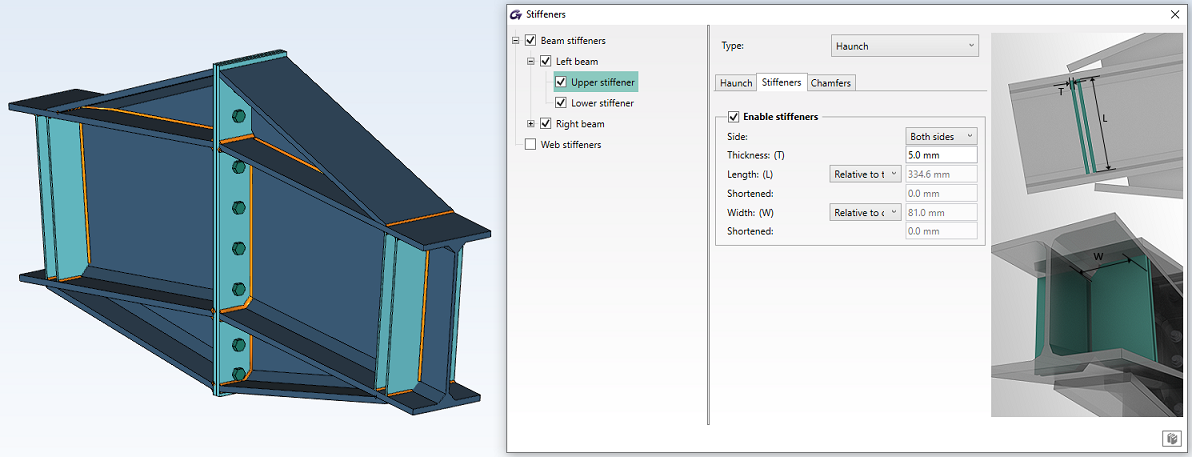
Apex haunch model with haunch stiffeners enabled

Apex haunch model with chamfers enabled for haunches and their stiffeners
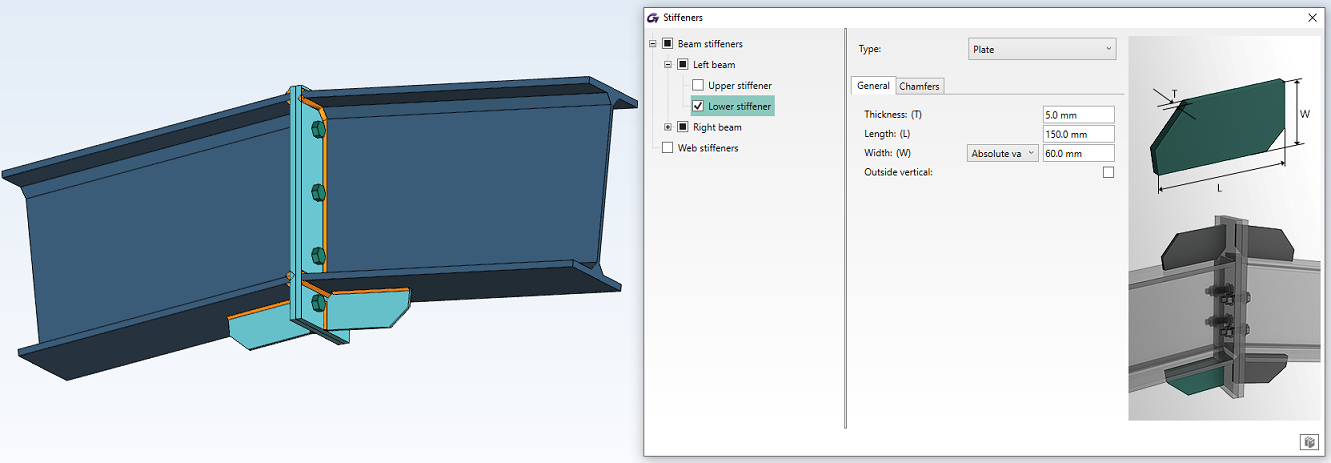
Apex haunch model with Lower plate stiffeners enabled

Apex haunch model with chamfers enabled for plate stiffeners
-
WEB STIFFENERS
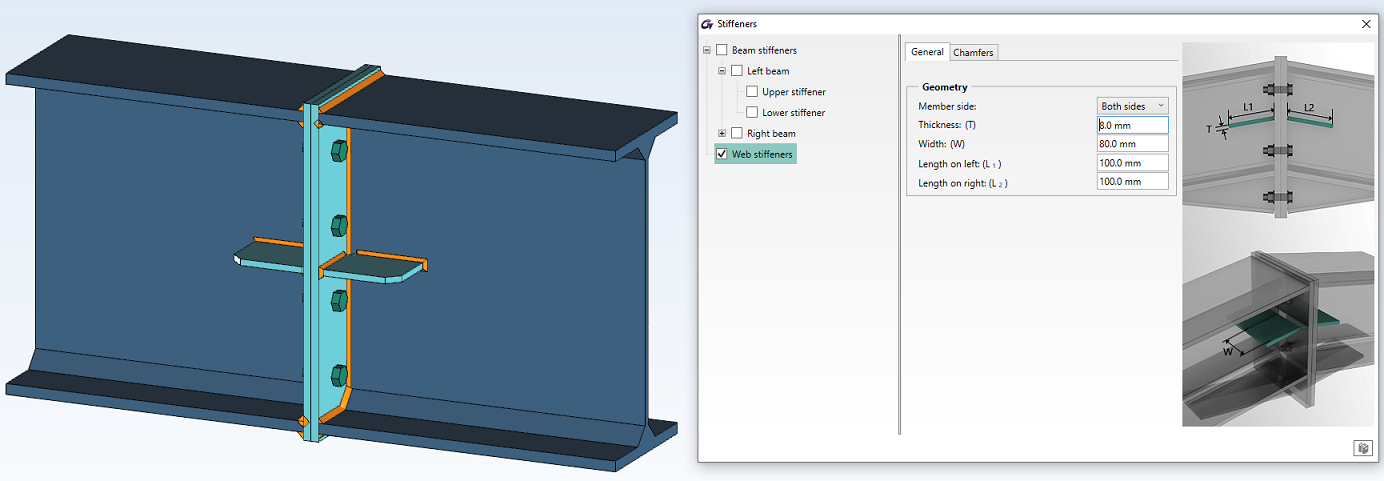
Apex haunch model with web stiffeners enabled
General tab:
- Member side: select an option from the associated drop-down: One side, Other side and Both sides to define on which side the stiffener will be created.
- Thickness: enter the thickness of the stiffener.
- Width: enter the width of the stiffener.
- Length on left: enter the length of the stiffener placed on left beam side.
- Length on right: enter the length of the stiffener placed on right beam side.

Apex haunch model with chamfers enabled for web stiffeners
Chamfers tab: contains the same parameters detailed on Beam stiffeners Plate type - Chamfers tab.
The Stiffeners command opens a dialog with options for configuring gusset stiffeners. Users can configure the available types of stiffeners (if enabled):
General tab:
-
Diagonal stiffeners: represent the stiffeners welded on the gusset plate and centered on the bolts group of the diagonal.

Gusset model with diagonal stiffeners enabled
- Thickness: enter the thickness of the stiffener.
- Side: select the gusset plate side on which the stiffener is placed: One side, Other side or Both sides.
- Column offset: enter the distance between stiffener and main beam.
- Plate offset: enter the distance between stiffener and diagonal.
Note: Column offset and Plate offset parameters appear twice in the dialog due to the fact that the first set of parameters is used for the stiffener located on One side and the second set is used for the stiffener located on Other side. First set of parameters: Column offset and Plate offset become editable only when One side or Both side option is selected. The second set of parameters: Column offset and Plate offset become editable only when Other side or Both side is selected.
-
Column stiffeners

Gusset model with all column stiffeners enabled
- Justification: select the column stiffeners positioning relative to gusset plate: Above, Below, Center.
- Thickness: enter the thickness of the stiffeners.
Parameters: Width, Shortening, Length and Shortening have the same meaning with the ones detailed at Column stiffeners for Moment end plate joint.
-
Reinforcement plates

Gusset model with reinforcement plates enabled
- Side: select the gusset plate side on which the stiffener is placed: One side, Other side or Both sides.
- Thickness: enter the thickness of the stiffener.
- Length start layout: select the reference from where the stiffener is placed: From bolts or From edge.
- Length layout: select how to define the stiffener: From bolts or Total.
- Start distance: enter the distance to place the stiffener from the selected reference Length start layout.
- End distance: enter the end distance of the stiffener measured from the end of the bolts group of the diagonal; the value becomes editable only when Length layout is set on From bolts.
- Length: enter the length for the stiffener; the value becomes editable only when Length layout is set on Total.
- Width: select an option from the associated drop-down to define the width of the stiffeners:
Total – enter the width of the stiffener.
Projection – the stiffener is defined on the entire width of the diagonal with the possibility to shorten this distance, by entering a value for Shortening parameter. In this case, the width of the stiffener is calculated automatically.
- Shortening: enter the shortening value for Width; becomes editable only when Width parameter is defined as Projection
Chamfers tab:
There are two frames displayed in the Chamfers dialog: Inner corner cut refers to the chamfer applied to the inner sides of the stiffener and Outer corner cut refers to the chamfers done on the outer sides of the stiffener.

Gusset model with chamfers enabled for diagonal stiffener
In this dialog, you can configure chamfers for the enabled stiffeners with the following parameters:
- Type: select the cut type between: Straight, Concave or Convex.
- Radius: enter the radius of the cut, available only for Concave and Convex chamfer types.
If Straight chamfer type is selected, the following will become editable:
- Height: enter the height of the cut.
- Width: enter the width of the cut.
Note: Chamfers tab is available only for Column stiffeners and Diagonal stiffeners.
-
Beam Stiffeners: Flange / Center
General tab:

Gable wall end plate model with flange and centered stiffeners enabled
Parameters: Side, Thickness, Length, and Shortening have the same meaning with the ones detailed at Column stiffeners for Moment End Plate joint.
- Width: select an option from the associated drop-down to define the width of the stiffeners:
Absolute value – enter the width of the stiffeners.
Relative to beam – the stiffener is defined from the web of the beam to the end of the beam flange and the width of the stiffener is calculated automatically.
Relative to beam + offset – the stiffener is defined from the web of the beam to the end of the beam flange with the possibility to shorten this distance, by entering a value for Shortened parameter. In this case, the width of the stiffener is calculated automatically.
- Shortened: enter the shortening value for the Width of the stiffeners. Available only when the reference Relative to beam + offset is selected for Width.
- Vertical: check the box to set the stiffeners vertical and not perpendicular to the beam flanges; relevant only when the beam has a slope.
Chamfers tab: contains the same parameters detailed on Column stiffeners – Chamfers tab - from Moment End Plate joint.

Gable wall end plate model with straight chamfers enabled for beam stiffeners
-
Beam Stiffeners: Web doubler

Gable wall end plate model with web doubler stiffeners enabled
Parameters: Side, Thickness, Width, Length, and Shortening have the same meaning with the ones detailed at Middle column stiffeners – Web doubler for Moment End Plate joint.
-
Column Stiffeners: category has two items to be configured: the Left stiffener and the Right stiffener.
Two types of column stiffeners are available: Haunch and Plates and contains the same parameters as the ones detailed at Beam stiffeners for Moment End Plate joint.

Gable wall end plate model with haunch defined from Profile

Gable wall end plate model with haunch defined from Plates

Gable wall end plate model with haunch stiffeners placed on both beam and column
Note: When Haunch type is selected for column stiffeners, the Stiffeners tab will contain properties to customize the stiffener for each part: the haunch stiffeners placed On column and the ones placed On beam.

Gable wall end plate model with chamfers enabled for haunch and its beam stiffener

Gable wall end plate model with plate stiffener enabled

Gable wall end plate model with chamfers enabled for beam stiffeners
-
Web Stiffeners
The dialog contains the same tabs and parameters as the ones detailed at Web stiffeners from Moment End Plate joint.

Gable wall end plate model with web stiffeners enabled

Gable wall end plate model with straight chamfers enabled for web stiffeners
General tab:
-
Column Stiffeners:
- Justification: select the column stiffeners positioning relative to gusset plate: Above, Below, Center.
- Orientation: select the orientation of the column stiffeners:
Orthogonal: the stiffeners are always perpendicular on the main beam flanges.
Parallel to gusset edge: the stiffeners will have the same orientation with the gusset edge.
Parameters: Side, Width, Shortening, Length, and Shortening have the same meaning with the ones detailed at Column stiffeners for Moment End Plate joint.

HSS Bracing model with upper and lower column stiffeners enabled
-
Diagonal Stiffeners

HSS Bracing model with diagonal stiffeners enabled
For each diagonal, the stiffeners can be enabled for the Front side or Back side.
The parameters: Thickness, Column Offset, and Plate Offset are the same as the one detailed at Diagonal stiffeners for Gusset joint.
-
Cover plates: First diagonal / Second diagonal / Third diagonal

HSS Bracing model with cover plate enabled
- Type: select the stiffener type:
Total: no sandwich/tab plate passes through the cover plate.
Slotted: sandwich/tab plates pass through the cover plate and split it into two pieces.
- Thickness: enter the thickness of the plate.
- Length: select an option from the associated drop-down to define the Length of the plate.
- Absolute value: enter the Length of the plate.
- Shortened: the plate is defined until the beam edges with the possibility to increase this distance, by entering a value for Shortening parameter. In this case, the length of the plate is calculated automatically.
- Shortening: enter the shortening value for the Length of the stiffeners. Available only when the reference Shortened is selected for Length.
- Chamfers tab: is the same as the one detailed at Gusset joint.
Note: Chamfers tab is available only for Column stiffeners and Diagonal stiffeners.

Gable wall end plate model with straight chamfers enabled for column stiffeners
Depending on the selected Plate type, the following stiffeners will be available:
-
For Round column section, one type of stiffener is available: the Diagonal stiffener, with the possibility to enable or disable it.
-
For Rectangular column section, three types of stiffeners are available, with the possibility to enable or disable them: Diagonal stiffeners, Outer stiffeners, and Side stiffeners.
Note: Outer stiffeners and Diagonal stiffeners cannot be used together.
General Tab
-
Side stiffeners – represent the stiffeners placed perpendicular to the member edges and are available only for rectangular column section. In case round column section are used, the Side stiffeners will be grayed out. The Side stiffeners can be positioned in two ways: Along width and Along length, each being located along a different direction from the other as it is shown below:

Tubular Base Plate model with side stiffeners
The following parameters are available for Side stiffeners:
- Thickness: enter the thickness of the stiffeners
- Number: enter the number of stiffeners
- Continuous: by checking this option the stiffener will pass through the column. This option will be influence and will be applied only the Side stiffeners situated inside the column edges until the root radius. In case both Side stiffeners will be enabled (Along length and Along width), the checkbox Continuous cannot be applied at the same time for both stiffeners type, the checkbox can be enabled only for one side. In case Outer stiffeners are enabled for a specific side (Along length or Along width) then the checkbox can no longer be enabled for that specific Side stiffeners.
- Width: select an option from the associated drop-down to define the width of the stiffeners:
Plate overhang: defines the stiffeners until the plate edges with the possibility to shorten these values using Shortening parameter
Absolute value: input the width value of the stiffeners
- Shortening: enter the shortening value for the Width of the stiffeners. Available only when the reference Plate overhang is selected for Width
- Height: enter the height value of the stiffeners
- Interm. dist.: option becomes available when the Number of stiffeners is greater than 1. Select from the drop-down how to define the distance between stiffeners:
Absolute value - enter the intermediate distance between two consecutive stiffeners.
Stretch to column side – the stiffeners are distributed until the column edges and the distance between stiffeners is calculated automatically.
- Shortening: option becomes available only when Interm. dist. parameter is set as Stretch to column side. Enter a value to change (shorten or extend) the distance on which stiffeners are defined. This will change the edge position for the first and the last stiffener from the group and the intermediate distance between stiffeners will be recalculated.
- Offset: select from the combo-box the reference from where the stiffeners group should be moved and then enter the value to shift the stiffeners group.
-
Outer stiffeners – are similar to the one from the current Base plate joint and will be available only for Rectangular column section. However, an additional parameter: Position is added, to change the direction of this stiffeners: Along width and Along Length. In case Rectangular column section is used, the Outer stiffeners will be disabled and grayed out.

Tubular Base Plate model with outer stiffeners
-
Diagonal stiffeners – available for Circular and Rectangular column section.

Tubular base plate model with diagonal stiffeners applied on a rectangular column

Tubular Base Plate model with diagonal stiffeners applied on a circular column
The following parameters are available for Diagonal stiffeners:
- Thickness, Width, Shortening and Height parameters are the same as the one presented for Sider Stiffeners
- Number: enter the number of stiffeners. Option can be editable only for Circular section
- Interm dist.: represents the distance between stiffeners and will have only an informative purpose and cannot be editable. For Circular column, the Interm dist. parameter represents the arc length measured on the outer edge of the column, between two consecutive stiffeners.
Chamfers Tab: contains the same parameters detailed at Base Plate joint.

Tubular Base Plate model with chamfers enabled for diagonal stiffeners
Related topics