Creating a Project
Every time you launch Advance Design, creating a new project is a simple process, accessible either through the start page, the Main menu or the Quick Access toolbar. Follow the user-friendly instructions below to create a new project in Advance Design.
Step-by-Step Guide
Follow these steps to create a new Advance Design project:
- Access the Main menu: Navigate to File and select New.
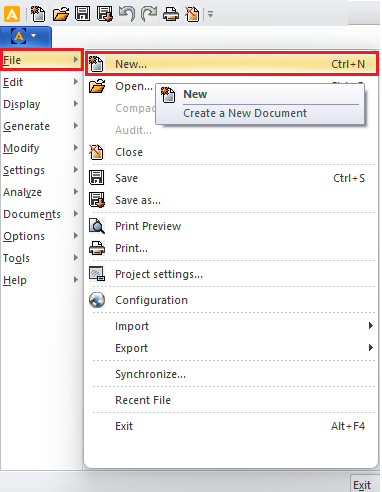
Creating a new Advance Design project
- Alternatively, use the Quick Access toolbar for swift project creation:

Creating a new Advance Design project
- Or use the Keyboard shortcut: <Ctrl+N>
After selecting one of the above methods, a new project will be automatically created and a dialog box will open for you to set the Project parameters.
Creating an Advance Design Project Using the Start Page
To create a new project in Advance Design from the Start page, it is recommended that you follow these steps:
- Launch Advance Design: Open the Advance Design application to access the Start Page.
- Start Page Navigation: On the Start Page, navigate to the left-side panel.
- Select "New": Click on the New option to initiate the project creation process.
- Configure Project Parameters: Once you click New, a new project will be automatically created, and a dialog box will open. Take this opportunity to configure the project parameters according to your specific requirements.

Creating a new Advance Design project from the Start page
By following these recommended steps, you can create a new project in Advance Design and configure it to meet your project's unique needs.