Simple Skill Example: Prompt vs Skill
This example shows how to move from a one-time prompt to a reusable AI Skill in GRAITEC Assistant. The process starts by creating a simple structure with a prompt, then converting the same workflow into a Skill that can be reused to automate repetitive modeling tasks.
Objective
The objective of this example is to understand why reusable AI Skills are more powerful than standalone prompts and how a Skill can be reused to automate repetitive modeling tasks.

From prompt to reusable AI Skill
The following steps show how the same modeling task can first be completed using a standalone prompt and then converted into a reusable Skill with Skill Creator. The created Skill is then reused and tested with different requests.
- Create the Structure Using a Prompt
Start by creating a single-story reinforced concrete bay using a prompt. This provides the initial structure that will later be converted into a reusable Skill.
Use a detailed prompt that specifies the geometry, materials, slab thickness, labels, and validation requirements.

Prompt used to generate the structure
- Generate the Skill with Skill Creator
Next, use Skill Creator to convert the workflow into a reusable Skill. Provide a prompt that instructs Skill Creator to generate a complete SKILL.md definition.

Prompt used to generate the Skill
Skill Creator creates the simple-concrete-structure Skill with the required defaults, inputs, workflow steps, and validation logic.

Using the Skill Creator prompt in GRAITEC Assistant
to create a Skill

Generated Skill
Once the Skill has been created, it is available in the Skill tree.

The created skill available in the Skill tree
- Use and Validate the Skill
Use the created Skill to generate the structure, then review the result and validate the created elements.

Structure created using the Skill
The Skill can also be triggered through another request. In the following example, the keywords “simple concrete building” are included in the Skill description, allowing GRAITEC Assistant to identify and use the appropriate Skill.

Defining defaults in the Skill is very important. If defaults are not provided and the Skill is not instructed to ask for the required values, the workflow is not deterministic and may fail or produce an unexpected result.

The result
The Skill can then be reused to add additional levels. In this example, the request triggers the same Skill because the keywords “add more stories” were added to the Skill description.
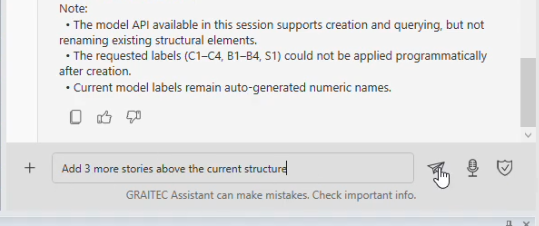
Reusing the Skill with a new request
The resulting structure includes the additional levels requested through the Skill.

Additional levels generated automatically
Best Practices
When creating and using a Skill:
- Use trigger-friendly descriptions in SKILL.md so that the Skill can be identified and used when prompting or when using agents in the future.
- Define clear defaults so the Skill can run without unnecessary questions.
- Keep workflows deterministic and repeatable.
- Always verify the created elements before reporting success. Query the model to confirm that the elements were created before reporting a successful result.
- Use Skills for reusable workflows and scripts for deterministic calculations.
- Test the Skill using both standard and edge-case inputs.
- Describe the desired engineering outcome before describing commands.
- Be explicit about geometry by specifying dimensions, slab thicknesses, and other required values.
- Define sensible defaults, such as materials and section sizes, to reduce unnecessary interaction.
- Define the sequence of the steps, for example: Footprint => Columns => Beams => Slab => Additional Levels => Validation.
- Think of the Skill as a template for building reusable automation workflows rather than one-off prompts.
- End with a report of what was done, including a concise summary of the generated results.
- Use scripts for calculations, generation, and validation tasks.
- Ask the Skill to use the available tools. Tools can also be listed in the Skill when they are known. If a required tool is unavailable, ask the Skill to report it.